
If you’re looking to speed up your website, improve user experience, and boost your SEO, one of the simplest steps you can take is optimizing your images. In this article, we compare three of the most popular WordPress image optimization plugins: ShortPixel, Smush, and EWWW Image Optimizer. We’ll explore their features, performance, ease of use, pricing, and more so that by the end, you’ll have a clear idea of which one suits your needs best.
Let’s dive in!
Table of Contents
Why Image Optimization Matters
Images are often the largest files on web pages, and if left unoptimized, they can significantly slow down loading times. Slow-loading pages frustrate users and harm SEO, as search engines favor fast, responsive websites. Additionally, mobile users—often on slower networks—suffer more when images aren’t properly compressed. On the flip side, optimized images maintain quality while reducing file size, ensuring fast loading and a smooth user experience.
In short, optimizing images helps:
- Boost page load speed
- Enhance user experience
- Improve SEO rankings
- Lower bandwidth usage
That’s why choosing the right image optimization plugin is crucial.
Overview of the Three Plugins
ShortPixel

ShortPixel is a plugin that compresses your WordPress site’s images and PDF files. It offers both lossy and lossless compression and leverages a cloud-based API to handle the process. With an easy setup and support for WebP conversion, ShortPixel is a robust solution, especially for users comfortable with setting up an API key.
Smush
Developed by WPMU DEV, Smush (also referred to as “WP Smush”) is one of the most widely used image optimization plugins for WordPress. Smush provides one-click optimization, lazy loading, and bulk smushing. The plugin focuses on ease and convenience, making it an excellent choice for beginners.
EWWW Image Optimizer
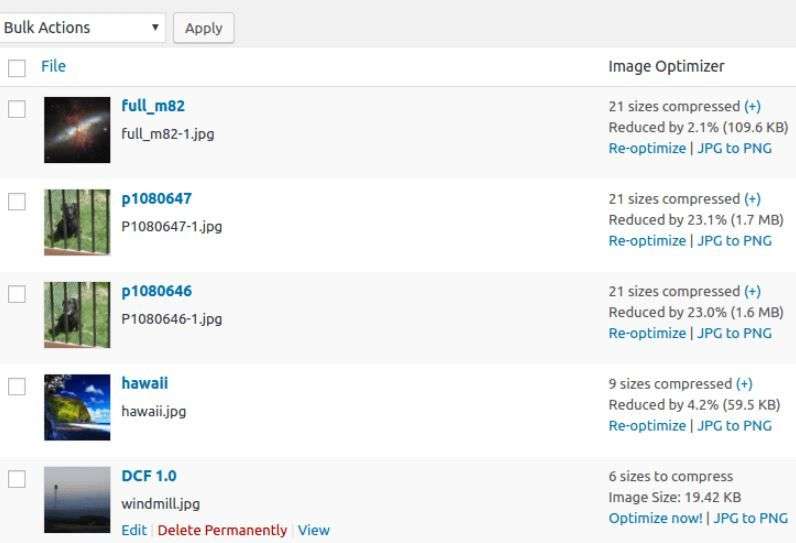
EWWW (Easy WebP, WebP Converter & Image Optimizer) is a comprehensive tool that allows both local (on your server) and cloud-based optimization. It supports a wide variety of formats and features things like automatic WebP conversion and CDN integration with its paid plans.
Ease of Use & Setup
ShortPixel
- Requires an API key (free tier available).
- Once installed and activated, setup is straightforward.
- Includes bulk optimization tools and automatic compression for new uploads.
- Clean interface, intuitive dashboard.
Smush
- Install and activate—nothing else required for basic use.
- Bulk smush is one click away.
- Lazy loading toggle, image size limits, and directory exclusions available.
- Excellent for non-technical users.
EWWW Image Optimizer
- No key required for on-server optimizations—just install and activate.
- For cloud services (for better compression), an API key is needed.
- Offers advanced controls (auto-convert to WebP, CDN integration) which may be slightly overwhelming at first.
- Flexible but may require a bit more configuration for users aiming for sophisticated setups.
Compression Quality & Types
ShortPixel
- Offers Lossy, Glossy, and Lossless modes.
- Lossy gives the best compression (smallest file size) accompanied by perceptible but minor quality loss.
- Glossy preserves more quality—ideal for photographers or image-rich sites.
- Lossless maintains image quality entirely, but with less impressive savings.
- Conversion to WebP included.
Smush
- Applies lossless compression by default.
- No lossy mode in the free version; pro version adds “Super Smush” (lossy) and WebP conversion.
- Sometimes larger final image sizes compared to others due to conservative compression.
EWWW Image Optimizer
- Offers both lossless and lossy compression.
- Uses various optimization engines (e.g., JPEGOptim, MozJPEG, OptiPNG).
- WebP generation and (with paid plan) smart compression available.
- Users can choose engines based on preferences—great if you like tinkering.
Performance & Speed
ShortPixel
- Quick compression thanks to cloud processing.
- Reduces server load as images are processed off-site.
- Additional speed benefits via WebP.
Smush
- Compresses on your server; might increase load if many images are involved.
- Lazy loading speeds up initial page render.
- Super Smush (Pro) uses more advanced compression algorithms for better results.
EWWW Image Optimizer
- On-server optimization can slow down performance if you process large images in bulk.
- Cloud processing mode (via API) alleviates that.
- WebP and CDN integration (via “Easy IO” service) can give a speed boost for end-users.
Features Comparison
| Feature | ShortPixel | Smush (Free / Pro) | EWWW Image Optimizer |
|---|---|---|---|
| API-based Compression | Yes | No | Optional (local and cloud) |
| Lossless Compression | Yes | Free version only | Yes |
| Lossy Compression | Yes (Lossy, Glossy) | Pro (Super Smush) | Yes (multiple engines) |
| Bulk Optimization | Yes | Yes | Yes |
| Lazy Loading | No (use separate plugin) | Yes (built-in) | Pro- or separate plugin |
| WebP Conversion | Yes (automatic) | Pro version only | Yes (with configuration) |
| CDN Integration | No (but WebP via JS fallback) | No | Yes (Easy IO, cloud) |
| PDF Optimization | Yes | No | No |
| Monthly Quota (Free) | 100 images per month | Unlimited uploads (compression) | Unlimited native (cloud may cost) |
| Pricing (Paid) | Pay-as-you-go | Subscription (WPMU DEV) | Bundled with cloud services or one-off |
Pricing & Value
ShortPixel
- Free: 100 images/month.
- Paid: Plans start small (e.g., 5,000 images) or pay-as-you-go credits.
- Credit model makes it flexible for sites of all sizes.
Smush
- Free version: unlimited optimization, but limited to lossless.
- Pro via WPMU DEV membership (starts around $13/month) includes unlimited site licensing and advanced features.
- Good for power users with other WPMU tools.
EWWW Image Optimizer
- Free version (local optimization) is unlimited.
- Cloud credits required for cloud compression or CDN; offered in packs.
- Reasonably priced and flexible if you only need occasional heavy tasks or CDN.
SEO & AdSense Friendliness
All three plugins help SEO by reducing page load time and improving Core Web Vitals. None of them use harmful or prohibited content, and all are perfectly Google AdSense friendly—no issues with ad policy.
Make sure to:
- Use descriptive image alt and title tags—a feature independent of plugin choice.
- Use WebP with JPEG/PNG fallback, especially for browsers that support it.
- Optimize images before upload—plugins take care of compression but not meta descriptions.
These practices make your site crawlable and boost search visibility, regardless of which plugin you choose.
Pros & Cons
ShortPixel
Pros:
- Excellent compression options (lossy, glossy, lossless).
- WebP conversion built-in.
- PDF files optimized too.
- API-based processing reduces server load.
Cons:
- Monthly free quota is limited.
- Requires API key and credit management.
- Might require upgrade for high-volume sites.
Smush
Pros:
- Very user-friendly.
- Lazy load out of the box.
- Unlimited free image optimization.
- Excellent for beginners.
Cons:
- Free version only does lossless (limited effectiveness).
- Pro plan needed for lossy and WebP.
- Compresses on server—higher load.
EWWW Image Optimizer
Pros:
- Local optimization means no recurring costs for basic usage.
- Supports lossy and lossless.
- WebP, CDN, and advanced engine choices.
- No monthly caps for local compression.
Cons:
- Initial configuration has a learning curve.
- Cloud services cost extra.
- On-server optimization may strain hosting on large jobs.
Real-world Scenarios: Which Plugin Should You Choose?
You’re a beginner, want a plug-and-play solution
Pick Smush Free. It’s easy, safe, and fast to get started.
You want top compression with minimal server strain
Choose ShortPixel. Excellent compression quality and WebP support, with API processing.
You’re advanced, want full control, and no monthly limits
Go with EWWW Image Optimizer. Flexible local setup, diverse engines, and option for CDN.
You host lots of PDFs, plus images
ShortPixel offers PDF compression—handy for document-heavy sites.
You need CDN for images, especially WebP serving
EWWW (with Easy IO) or ShortPixel (via fallback JS) handles it better; Smush Pro supports WebP but lacks true CDN integration.
Frequently Asked Questions (Q&A)
Below are some common questions readers might ask about these three plugins, based on the content of this article:
- Which plugin gives the smallest image size?
- ShortPixel (lossy mode) generally offers the most aggressive compression and smallest files. EWWW’s lossy with optimized engines also performs well.
- Is the free plan of Smush good enough?
- For basic use, yes—especially if you value simplicity. But the free plan uses lossless compression; the difference to lossy could be significant depending on your needs.
- Do I need to worry about hosting performance?
- Yes—Smush uses your server resources for processing. ShortPixel handles compression off-site. EWWW’s local processing can be resource-intensive for bulk compressions; you may prefer cloud if concerned.
- What about converting to WebP?
- ShortPixel does this automatically (with fallback). Smush requires Pro for WebP. EWWW allows WebP via settings (and even serves via CDN if configured).
- Which plugin best supports PDFs?
- ShortPixel offers direct PDF compression. Neither Smush nor EWWW do this natively.
- Can I optimize thousands of images at once?
- Yes, all three offer bulk optimization. Just be mindful of server load with Smush and EWWW (for local modes). ShortPixel’s API handles it more gracefully.
- Are there recurring costs I should worry about?
- Smush Pro requires a subscription. ShortPixel operates with credits—buy more as needed. EWWW’s local mode has no recurring costs; cloud services are pay-as-you-go.
- Do these plugins affect AdSense or violate Google policies?
- No. They enhance performance and are fully compatible with AdSense policies.
- Which is the easiest plugin to use?
- Smush Free is the simplest to get started with. ShortPixel and EWWW offer more features but may need configuration adjustments.
- Which plugin gives the best overall value?
- It depends on your scenario: for small sites, ShortPixel’s credit model is cost-effective; for new users, Smush is best in simplicity; for power users, EWWW offers unmatched flexibility.
Conclusion
Choosing between ShortPixel, Smush, and EWWW Image Optimizer comes down to your priorities:
- ShortPixel gives you excellent compression (lossy, glossy, or lossless) and WebP support, with minimal server load—ideal if you’re comfortable managing credits.
- Smush shines in ease of use. The free version works well, and the Pro version unlocks advanced features—but it’s all on your server.
- EWWW Image Optimizer offers maximum flexibility and control—local optimization for free, plus optional cloud/CDN services—but demands a bit more technical setup.
All three improve site speed and SEO, and all are friendly to Google AdSense. Evaluate your needs around ease, budget, performance, server load, and additional features like PDF support or CDN access. In many cases, ShortPixel presents a balanced blend of performance and convenience; Smush is best for beginners; and EWWW is ideal for advanced users looking for control.
Make your pick, optimize those images, and enjoy faster load times and happier visitors!